QuickBooks Payroll Error PS038 is a common issue that affects users when updating payroll tax tables or processing payroll in QuickBooks Desktop. This error usually appears because one or more paychecks remain stuck with the “Online to Send” status, preventing QuickBooks from communicating properly with Intuit’s payroll servers. As a result, businesses may be unable to download payroll updates, submit payroll data, or complete payroll processing.
Fortunately, Error PS038 can be resolved by identifying the stuck paychecks, rebuilding the company file, and resetting the affected payroll transactions. This comprehensive guide explains the causes of QuickBooks Payroll Error PS038 and provides step-by-step solutions to help restore your payroll functionality quickly.
What Is QuickBooks Payroll Error PS038?
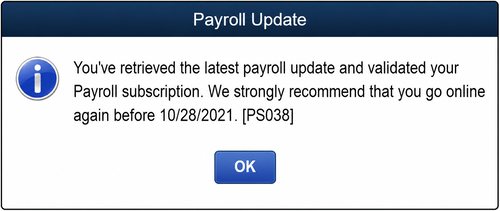
QuickBooks Payroll Error PS038 occurs when payroll transactions are marked as “Online to Send” but never successfully reach Intuit’s servers. Since these pending paychecks remain in the queue, QuickBooks blocks payroll updates until the issue is resolved.
Common Error Message
You may encounter a message similar to:
“QuickBooks has detected a problem with your payroll data. Error PS038.”
This typically happens during payroll updates, tax table downloads, or payroll synchronization.
Why Does QuickBooks Payroll Error PS038 Occur?
Several factors can trigger Error PS038 in QuickBooks Desktop, including:
- Paychecks stuck in the “Online to Send” status, preventing payroll processing.
- Damaged or corrupted payroll data that interferes with payroll updates.
- Company file data integrity issues caused by file corruption or data damage.
- Outdated QuickBooks Desktop software missing the latest payroll fixes and updates.
- Interrupted payroll synchronization with Intuit, preventing successful data transmission.
- Incomplete or failed payroll tax table updates, leaving payroll information partially updated.
Understanding the underlying cause of QuickBooks Payroll Error PS038 makes it easier to apply the appropriate troubleshooting steps and restore normal payroll functionality.
Prerequisites Before Troubleshooting QuickBooks Error PS038
Before attempting to fix QuickBooks Payroll Error PS038, ensure you have the following:
- The latest version of QuickBooks Desktop installed.
- A recent backup of your company file.
- Your QuickBooks Payroll Service PIN.
- An active internet connection.
- Successful synchronization with Intuit payroll services.
Creating a backup is highly recommended so your financial data remains protected throughout the troubleshooting process.
How to Fix QuickBooks Payroll Error PS038?
If you’re encountering QuickBooks Error PS038, following the correct troubleshooting steps can help restore payroll functionality and download payroll updates without interruption. Use the solutions below to identify stuck paychecks, repair company file issues, and resolve Error PS038 efficiently.
Step 1: Sync Payroll Data with Intuit Servers
The first step is to verify whether your payroll data can successfully communicate with Intuit’s servers. Follow These Steps:
- Open QuickBooks Desktop.
- Navigate to the Employees menu.
- Select My Payroll Service.
- Click Send Usage Data or Send Payroll Data.
- In the Send/Receive Payroll Data window, select Send All.
- Enter your Payroll Service PIN if prompted.
- Complete the data transmission process.
After the transmission finishes successfully, attempt to download payroll updates again.
If the issue persists, proceed to identify and repair stuck payroll transactions.
Step 2: Locate Stuck Paychecks in QuickBooks
Paychecks marked as “Online to Send” are often the primary cause of Payroll Error PS038. Identifying these transactions is essential before attempting further repairs. Follow these instructions:
- Select the Edit menu.
- Click Find.
- Open the Advanced tab.
- In the Choose Filter section, select Detail Level from the filter list.
- Choose Summary Only.
- Return to the filter options.
- Scroll down and select Online Status.
- Choose Online to Send.
- Click Find.
QuickBooks will display all payroll checks that have not yet been transmitted to Intuit.
Important Information to Record
While reviewing the search results:
- Note the oldest paycheck displayed.
- Record the total Number of Matches shown in the Find window.
- Close the Find window once the information is documented.
This information may be useful during the repair process.
Step 3: Verify and Rebuild QuickBooks Company Data
Data corruption within the company file can trigger payroll errors and prevent payroll information from being processed correctly.
a. Run Verify Data Utility
The Verify Data utility scans the company file for damage and identifies inconsistencies.
- Open the File menu.
- Select Utilities.
- Click Verify Data.
- Allow QuickBooks to complete the scan.
If QuickBooks detects issues, proceed with the Rebuild Data utility.
B. Run Rebuild Data Utility
The Rebuild Data tool repairs identified company file problems.
- Go to File.
- Select Utilities.
- Click Rebuild Data.
- Follow the on-screen prompts.
- Create a backup if QuickBooks requests one.
- Wait for the rebuild process to complete.
Once finished, reopen QuickBooks and attempt to download payroll tax table updates. If QuickBooks Error PS038 still appears, continue with the paycheck toggling method.
Step 4: Toggle Stuck Paychecks to Reset Their Status
When rebuilding data does not resolve the issue, manually editing and resetting each stuck paycheck can force QuickBooks to refresh the transaction status.
How to Toggle a Stuck Paycheck?
Perform the following steps for every paycheck identified in the search results.
A. Open the Paycheck
- Open the paycheck.
- Select Paycheck Detail.
B. Add a Duplicate Earnings Item
- Under the Earnings section, locate the last earnings item listed.
- Add the same earnings item again.
For Example: If the last item is Hourly Rate, add another Hourly Rate entry.
C. Respond to System Prompts
- When the Net Pay Locked message appears, click No.
- Verify that the tax calculations and net pay remain unchanged.
- Select OK.
- If a Past Transaction warning appears, click Yes.
- Choose Save & Close.
- If a Recording Transaction warning displays, select Yes.
D. Remove the Duplicate Entry
- Reopen the same paycheck.
- Click Paycheck Details.
- Delete the duplicate earnings item that was added.
- Confirm that tax amounts and net pay are still accurate.
- Select OK to save the changes.
Repeat this process for every paycheck that remains in the “Online to Send” status.
Verify That Error PS038 QuickBooks Has Been Resolved
After toggling all affected paychecks:
- Run Verify Data again.
- Perform another Rebuild Data if necessary.
- Attempt to download the latest payroll tax table updates.
- Process payroll normally.
In most cases, QuickBooks successfully clears the stuck transactions and removes Payroll Error PS038.
QuickBooks Error PS038 vs. PS033 vs. PS077: Key Differences
Although QuickBooks Payroll Errors PS038, PS033, and PS077 all occur during payroll updates, they have different causes and require different troubleshooting methods. Understanding these differences can help you identify the issue quickly and apply the correct solution.
| Error Code | Primary Cause | Common Symptoms | Recommended Solution |
| PS038 | Paychecks are stuck in the “Online to Send” status or payroll data is damaged. | Unable to download payroll updates or tax tables; payroll update fails. | Identify and reset stuck paychecks, then run the Verify Data and Rebuild Data utilities. |
| PS033 | Damaged or unreadable payroll files, inactive payroll subscription, or incorrect service key information. | Payroll updates fail, and QuickBooks cannot validate payroll files. | Update QuickBooks, verify your payroll subscription, and repair or reinstall payroll components if necessary. |
| PS077 | QuickBooks cannot access payroll update files due to corrupted files, incorrect billing information, or insufficient permissions. | Payroll tax table updates fail with Error PS077. | Update QuickBooks, verify payroll billing details, run QuickBooks as an administrator, and download the latest payroll updates again. |
While all three errors interrupt payroll processing, PS038 is specifically related to stuck payroll checks, whereas PS033 and PS077 are generally caused by payroll file corruption, subscription issues, or update-related problems. Identifying the correct error code ensures you can follow the appropriate troubleshooting steps and restore payroll functionality efficiently.
Tips to Prevent QuickBooks Error Code PS038
To minimize the risk of encountering this payroll issue in the future, follow these best practices:
- Keep QuickBooks Updated: Always install the latest QuickBooks Desktop updates and payroll tax table releases.
- Send Payroll Data Regularly: Transmit payroll information promptly to avoid unsent transactions accumulating in the system.
- Verify Company Data Frequently: Run the Verify Data utility regularly to detect potential file issues before they become serious.
- Maintain Company File Backups: Create routine backups to protect payroll information and simplify recovery if file corruption occurs.
- Monitor Payroll Transmission Status: Check for pending payroll transmissions after each payroll run to ensure all data has been successfully sent.
Final Thoughts
QuickBooks Desktop Payroll Error PS038 can interrupt payroll processing by preventing tax table updates and payroll submissions. The issue usually stems from paychecks stuck in the “Online to Send” status or company file data damage.
The most effective solution involves syncing payroll data, identifying stuck paychecks, running Verify and Rebuild Data utilities, and manually toggling affected payroll checks. Once these steps are completed, QuickBooks can successfully transmit payroll information and download the latest payroll updates.
By maintaining updated software, monitoring payroll transmissions, and routinely verifying company data, you can significantly reduce the likelihood of encountering Error PS038 in the future.
Frequently Asked Questions
QuickBooks Error PS038 typically prevents payroll processing because one or more paychecks are stuck in the “Online to Send” status. These unsent payroll transactions block communication with Intuit’s payroll servers, making it impossible to download payroll updates or run payroll until the issue is resolved.
QuickBooks Error PS034 is a payroll update error that usually occurs when the payroll update file becomes damaged or unreadable. Common causes include an outdated QuickBooks Desktop version, corrupted company files, incomplete payroll updates, or issues with payroll subscription validation.
You may be unable to send usage data due to an inactive payroll subscription, internet connectivity issues, incorrect payroll service settings, firewall restrictions, or damaged company file data. Verifying your payroll subscription and ensuring a stable internet connection can often help resolve the issue.
QuickBooks Error PS077 generally occurs when QuickBooks cannot read or register a payroll update file correctly. This error may result from insufficient administrative permissions, damaged payroll files, incorrect billing information, or an outdated QuickBooks version. Updating QuickBooks, verifying payroll subscription details, and running the QuickBooks Tool Hub can help fix the error.
Yes, Error PS038 can impact direct deposit processing if payroll data cannot be transmitted successfully to Intuit. Until the stuck paychecks are corrected and payroll communication is restored, scheduled direct deposits may be delayed. Resolving the error promptly helps ensure employees receive payments on time.